miniconda官网下载地址:
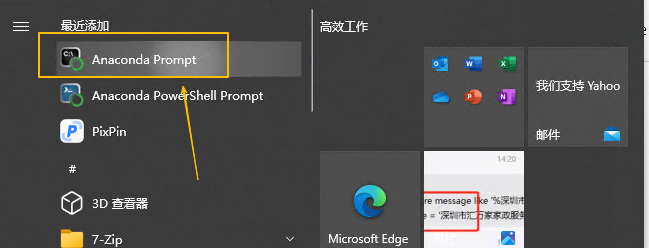
https://docs.conda.io/en/latest/1、下载后直接下一步安装即可,要勾选自动添加到环境变量中,安装后在开始菜单中可以看到conda的命令行工具,如图:

2、配置国内镜像源,配置为默认的包安装方式,如下:
conda config --add channels https://mirrors.tuna.tsinghua.edu.cn/anaconda/cloud/conda-forge/
conda config --add channels https://mirrors.tuna.tsinghua.edu.cn/anaconda/pkgs/main/
conda config --set channel_priority strict   //优先级
3、在使用conda创建虚拟环境前需要接受官方的服务条款,否则无法创建,执行如下命令:
conda tos accept --override-channels --channel  https://repo.anaconda.com/pkgs/msys2
conda tos accept --override-channels --channel  https://repo.anaconda.com/pkgs/r
conda tos accept --override-channels --channel https://repo.anaconda.com/pkgs/main
4、创建虚拟环境,执行如下命令:
conda create -y -n pandas-test python=3.13- -y :创建过程中选择yes
- -n:指定虚拟环境名字
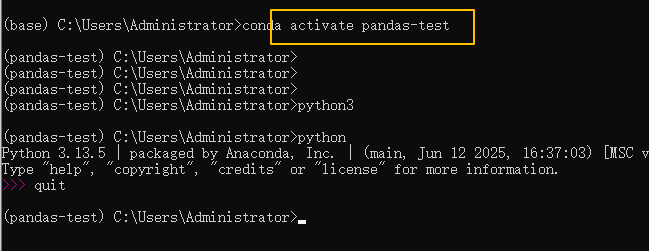
5、激活虚拟环境,并查看python版本,如图:
其他命令:
conda clean --all  //清除缓存
conda config --remove channels conda-forge  //移除频道
conda config --show channels   //显示频道
conda info    //查看.condarc文件内容