
mysql安全
本例子中以mysql5.7.44为例子进行演示
Connection-Control Plugins
MySQL 的 Connection-Control Plugins 是一组用于增强数据库安全性的插件,主要通过控制客户端连接行为来防止恶意访问或减轻潜在的 DDoS 攻击。以下是关于如何配置 connection-control 插件及其相关参数的详细说明
Connection-Control Plugins 包括以下两个插件:
connection_control:负责管理客户端连接的限制功能connection_control_failed_login_attempts:跟踪客户端的失败登录尝试
1、安装插件
在 MySQL 5.7 及更高版本中,connection_control.so 插件文件默认存在于 MySQL 的插件目录中,但是使用之前需要安装,可以通过以下命令动态安装插件,如下:
INSTALL PLUGIN CONNECTION_CONTROL SONAME 'connection_control.so';
INSTALL PLUGIN CONNECTION_CONTROL_FAILED_LOGIN_ATTEMPTS SONAME 'connection_control.so';
安装完成后,可以通过以下命令验证插件状态,安装成功就是ACTIVE状态:
SELECT PLUGIN_NAME, PLUGIN_STATUS FROM INFORMATION_SCHEMA.PLUGINS WHERE PLUGIN_NAME LIKE 'connection%';
或者show plugins;也可以查看到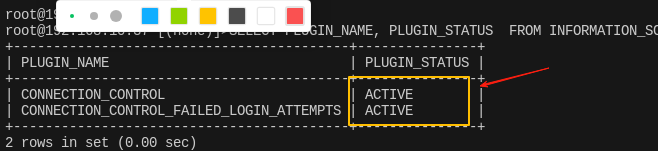
2、常用参数如下:
connection_control_failed_connections_threshold:定义允许的最大连续登录失败次数。默认值为 3,表示当连续失败 3 次后启用连接控制。设置为 0 时禁用该功能connection_control_min_connection_delay:定义客户端连接的最小延迟时间(单位:毫秒)。默认值为 1000 毫秒(1 秒),取值范围为 1000–2147483647
3、动态修改配置(重启后将失效),在mysql命令行执行如下:
SET GLOBAL connection_control_failed_connections_threshold = 5;
SET GLOBAL connection_control_min_connection_delay = 600000;  -- 600 秒
4、永久修改配置,在配置文件my.cnf中添加,如下:
[mysqld]
plugin-load-add = connection_control.so
connection_control_failed_connections_threshold = 5
connection_control_min_connection_delay = 600000
5、查询失败登陆记录:
插件会将失败的登录尝试记录到information_schema.connection_control_failed_login_attempts 表中