Hermes 里的 profile(配置文件/配置档) 不是”用户账号”,也不是单纯改 SOUL.md 人格——它本质是「一份完全独立的 Hermes 运行环境」,底层就是换个 HERMES_HOME 目录,把配置、密钥、记忆、技能、会话全部隔离。
总结: Profile = 同一台机器上”再装一个全新的 Hermes”,但共用同一个 CLI 二进制
每个 profile 自己带什么(完全不互通),在 ~/.hermes/profiles/<名字>/ 下,各有各的:
- config.yaml —— 模型、provider、toolsets、context 长度等所有运行配置
- .env —— API Key、Bot Token 等密钥
- SOUL.md —— 这个 profile 的人格/语气
- memories/ —— MEMORY.md / USER.md,跨会话记忆隔离
- skills/ —— 装了哪些 skill 互不影响
- sessions/ state.db cron/ logs/ —— 会话历史、定时任务、日志全隔离
说明:新建的profile的config.yaml中内容非常少,因此创建后可按照页面提示进行全部配置,否则可能卡死,如图:
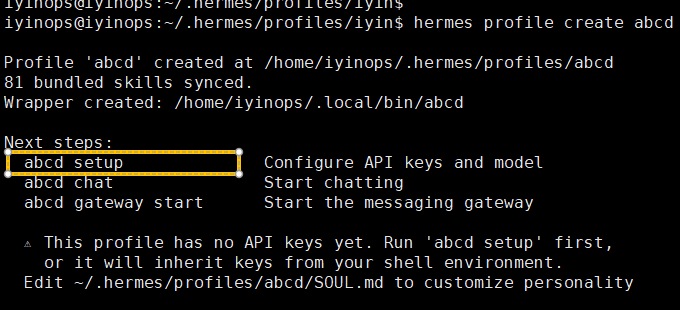
新建profile
# 空白新建(带基础 skills 种子)
test@localhost:~$ hermes profile create abcd

# 从当前 profile 复制配置/SOUL/.env/skills,但记忆和会话清零(最常用)
test@localhost:~$ hermes profile create abcd --clone

# 完全克隆(连记忆、cron、skills 全拷,不含 sessions 大文件)
test@localhost:~$ hermes profile create abcd --clone-all

#新创建profile,没有任何skills
test@localhost:~$ hermes profile create abcd --no-skills
建完会自动在 ~/.local/bin/ 生成同名命令别名,你可以直接:
test@localhost:~$ abcd chat          # 用 coder 这个 profile 进对话
test@localhost:~$ abcd config set model.default MiniCPM5-1B   # 只改 coder 的模型
注意:新建profile 如果选择–no-skills,那么全部技能都不加载,有利于提供相应速度
后续的很多命令都可以在新建的profile执行,因为它跟原来的hermes已经是两套独立的环境,终端执行:
test@localhost:~$ abcd                      #进入cli界面
test@localhost:~$ abcd prompt-size          #查看提示词大小
test@localhost:~$ abcd model                #配置模型
test@localhost:~$ abcd gateway setup        #配置消息平台
test@localhost:~$ abcd tools                #启用关闭工具
test@localhost:~$ abcd --help               #查看帮助
~/.local/bin/abcd 本质就是一个脚本,实际走的命令是hermes -p abcd,如图:

备注,如果执行abcd 或者 abcd chat,可能会很卡,通过查看进程可以看到可能在安装edge-tts,这是文字转语音的包(禁用这个工具也会安装,不知道为什么),可手动执行命令安装,等系统自己安装很慢
/home/iyinops/.hermes/hermes-agent/venv/bin/python -m pip install edge-tts==7.2.7 -i https://mirrors.aliyun.com/pypi/simple/ --trusted-host mirrors.aliyun.com