
openclaw在线部署与升级
Openclaw主要功能
网络与信息
- 上网冲浪:帮你搜索最新信息、查天气、看新闻,或者抓取网页内容
- 获取资讯:不管是查代码库、看技术文档还是找生活小贴士,我都能搞定
文件与工作区
- 文件管理:读取、写入、编辑你工作区(
/data/openclaw/workspace)里的任何文件 - 代码助手:帮你写代码、改 Bug、重构项目,或者运行脚本
- 文档整理:帮你记笔记、整理会议纪要、写报告
智能与自动化
- 多任务处理:我可以“分身”(Spawn sub-agents),同时帮你跑多个任务,比如一边下载文件一边整理数据
- 定时任务:设置提醒、定期执行脚本、自动检查邮件或日历(通过 Heartbeat 或 Cron)
- 长期记忆:我会把重要的事记在
MEMORY.md或每日笔记里,下次聊天我还能记得住
极客玩法 (如果配置了的话)
- 智能家居:如果你家里有接入 Home Assistant 或类似设备,我能帮你控制灯光、查看摄像头(通过技能)
- 服务器管理:帮你 SSH 到远程服务器、跑命令、看日志
- 飞书/钉钉集成:帮你读写飞书文档、管理云盘文件、发送消息等
环境准备:
| 系统 | ubuntu24.04 |
| node | 版本>=22 |
openclaw安装方式有在线安装和离线安装还有容器化安装,使用普通用户安装
一、在线安装,可执行如下命令:
useradd -m openclaw && passwd openclaw
#直接使用openclaw登录机器然后安装,不要使用su - openclaw切换安装
# 使用淘宝 npm 镜像,大幅提升下载速度
npm config set registry https://registry.npmmirror.com
curl -fsSL https://openclaw.ai/install.sh | bash   #一键安装
或
useradd -m openclaw && passwd openclaw
#直接使用openclaw登录机器然后安装,不要使用su - openclaw切换安装
#使用淘宝 npm 镜像,大幅提升下载速度
npm config set registry https://registry.npmmirror.com
npm install -g openclaw@latest  #全局安装
或
useradd -m openclaw && passwd openclaw
#直接使用openclaw登录机器然后安装,不要使用su - openclaw切换安装
# 使用淘宝 npm 镜像,大幅提升下载速度
npm config set registry https://registry.npmmirror.com
openclaw onboard --install-daemon   #新手向导安装
问题一:登录页面后提示错误:
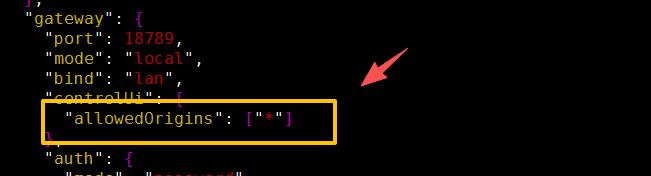
origin not allowed (open the Control UI from the gateway host or allow it in gateway.controlUi.allowedOriginsOpenClaw 默认只允许从 Gateway 所在机器的本地(127.0.0.1/localhost)访问控制面板,当你从其他 IP(比如局域网、外网)访问时,就会触发这个「跨域 / 来源限制」报错,解决方案:
首先切换到openclaw用户,修改openclaw.json文件,修改允许跨域,如图:
问题二:页面提示:
control ui requires device identity (use HTTPS or localhost secure context)这个报错是浏览器的安全策略限制,而非 OpenClaw 本身的配置问题,OpenClaw 的控制面板(Control UI)需要「安全上下文(Secure Context)」才能获取设备标识(Device Identity),而浏览器仅认为以下两种场景是「安全的」:
localhost/127.0.0.1(本机访问)- HTTPS 加密访问(非本机 / 外网访问)
解决方案:
1、直接在openclaw部署机器上通过localhost访问,但如果在Linux上部署,又在其他机器上访问,显然这种方式不适合
2、配置https,可通过nginx代理到后端的openclaw机器上,如下:
server {
  listen 443 ssl http2;
  listen [::]:443 ssl http2;
  ssl_certificate  /etc/nginx/cert/openclaw.test.com.crt;
  ssl_certificate_key /etc/nginx/cert/openclaw.test.com.key;
  ssl_protocols TLSv1 TLSv1.1 TLSv1.2 TLSv1.3;
  ssl_prefer_server_ciphers on;
  ssl_ciphers ECDHE-RSA-AES128-GCM-SHA256:ECDHE-ECDSA-AES128-GCM-SHA256:ECDHE-RSA-AES256-GCM-SHA384:ECDHE-ECDSA-AES256-GCM-SHA384:DHE-RSA-AES128-GCM-SHA256:DHE-DSS-AES128-GCM-SHA256:kEDH+AESGCM:ECDHE-RSA-AES128-SHA256:ECDHE-ECDSA-AES128-SHA256:ECDHE-RSA-AES128-SHA:ECDHE-ECDSA-AES128-SHA:ECDHE-RSA-AES256-SHA384:ECDHE-ECDSA-AES256-SHA384:ECDHE-RSA-AES256-SHA:ECDHE-ECDSA-AES256-SHA:DHE-RSA-AES128-SHA256:DHE-RSA-AES128-SHA:DHE-DSS-AES128-SHA256:DHE-RSA-AES256-SHA256:DHE-DSS-AES256-SHA:DHE-RSA-AES256-SHA:!aNULL:!eNULL:!EXPORT:!DES:!RC4:!3DES:!MD5:!PSK;
  ssl_session_timeout 10m;
  ssl_session_cache builtin:1000 shared:SSL:10m;
  ssl_buffer_size 1400;
  add_header Strict-Transport-Security max-age=15768000;
  add_header Access-Control-Allow-Origin *;
  add_header Access-Control-Allow-Methods "GET, POST, OPTIONS, PUT, DELETE";
  add_header Access-Control-Allow-Headers "X-Requested-With, Content-Type, Authorization";
  server_name openclaw.test.com;
  location / {
	proxy_pass http://127.0.0.1:18789;
        proxy_set_header Host $host;
        proxy_set_header X-Real-IP $remote_addr;
        proxy_set_header X-Forwarded-For $proxy_add_x_forwarded_for;
        proxy_set_header X-Forwarded-Proto $scheme;
        # WebSocket 核心配置(必须加,否则连接断开)
        proxy_http_version 1.1;
        proxy_set_header Upgrade $http_upgrade;
        proxy_set_header Connection "upgrade";
        proxy_read_timeout 86400;
  }
}问题三、页面提示如下:
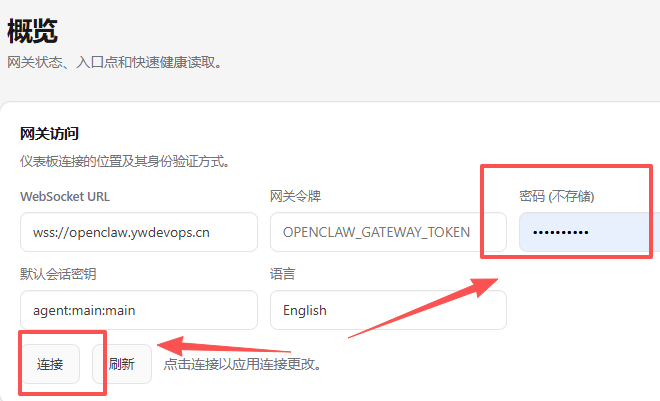
unauthorized: gateway password missing (enter the password in Control UI settings)报错为没有连接gateway,在概览界面,输入在安装openclaw过程中配置的gateway密码即可,如图:
问题四:提示pairing required
pairing required 是 OpenClaw 的设备配对安全机制:新设备 / 浏览器首次连接时,必须在服务端手动批准才能接入,解决方案:
1、查看待批准的设备(在openclaw部署的服务器上执行),如下:
openclaw devices list 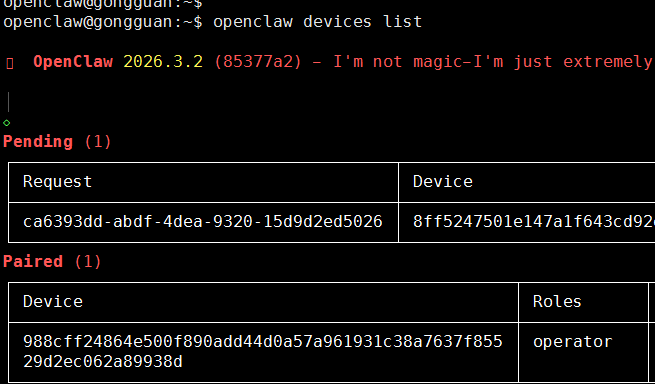
注:Request是请求待批准的设备,如果长时间不登录或者涉及敏感操作,会被要求重新批准的
2、执行如下命令批准,如下:
openclaw devices approve ca6393dd-abdf-4dea-9320-15d9d2ed50263、最后重启gateway即可,如下:
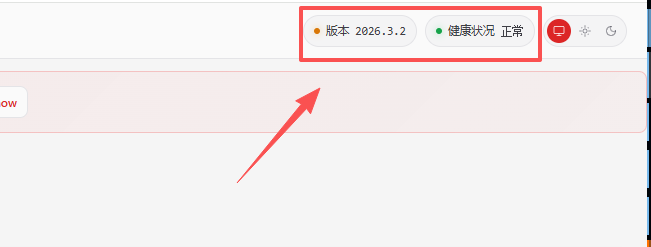
openclaw gateway restart4、openclaw的页面也可以看到当前状态为正常,如图:
升级
1、备份工作空间下的.openclaw,如下:
tar -czf openclaw-backup-20260317.tar.gz /data/openclaw/.openclaw2、查看当前openclaw版本,如下:
openclaw --version3、查看openclaw当前的最新版本,如下:
npm view openclaw version4、执行升级计划,如下:
sudo npm update -g openclaw #以普通用户执行需要加sudo否则权限不足重新登录
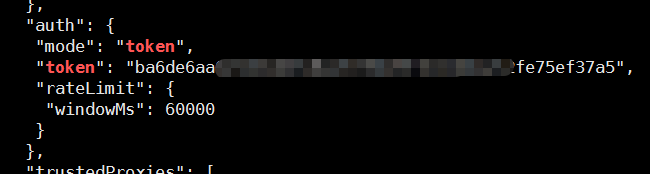
如果换了设备,需要重新获取token登录,可在Openclaw.json中找到auth位置的token,登录即可,如图:
容器化安装
官方镜像:
ghcr.io/openclaw/openclaw:latest