Hermes Agent 是由 Nous Research 开发的一款开源自主 AI 智能体框架。它最大的特点是具备“自我进化”能力——它能在服务器上 7×24 小时运行,通过“执行-反思-沉淀”的闭环,将你的操作习惯自动固化为可复用的技能,实现“越用越聪明”。
优点:
- 学习闭环(Self-Improving):这是它最核心的差异点。传统 AI 每次对话都是“失忆”的,而 Hermes 会自动将成功的任务流程总结成 Markdown 格式的 Skill(技能)。下次遇到类似任务,它会直接调用优化后的技能,不再从零开始
- 持久记忆(Persistent Memory):基于 SQLite + FTS5 全文检索,它能跨会话记住你的项目上下文、偏好和长期约束,不再需要你每次都重复背景信息
- 工具狂魔(40+ Tools):原生支持终端命令执行、文件操作、网页抓取、截图识别等,并可通过 MCP(Model Context Protocol) 无限扩展工具链(如连接数据库、K8s)
- 多平台网关:一个后台可同时接入 Telegram、Discord、微信、飞书、钉钉、CLI 等 10+ 个入口,让你随时随地通过自然语言指挥它干活。
能做什么:
- 自动化 DevOps:让它帮你定时拉取代码、运行测试、清理日志,甚至通过 SSH 管理远程服务器
- 个人数字助理:在微信/飞书中直接让它“帮我查一下今天服务器负载”或“总结这周的 commit 记录”
- 代码协同:配合大模型作为大脑,Hermes 作为手脚,实现“口述需求 -> 自动写代码 -> 自动测试”的全流程
与openclaw哪个更强?
- 这两个框架没有绝对的“强弱”之分,它们的设计哲学和适用场景截然不同。Hermes Agent 是“会进化的数字同事”,OpenClaw 是“连接一切的超级网关”。
核心对比:
| 维度 | Hermes Agent | OpenClaw (龙虾) |
|---|---|---|
| 核心标签 | 自我进化 (Self-Improving) | 消息网关 (Gateway) |
| 设计目标 | 让 AI Agent 越用越聪明,沉淀专属技能和记忆 | 让你用一个 Agent 同时对接 20+ 平台(TG / 微信 / 网页等) |
| 核心优势 | 深度记忆、技能自动生成,强学习能力 | 生态极丰富,消息分发和多平台接入能力拉满 |
| 典型用户 | 技术玩家、DevOps / 开发者,想要定制化能力 | 普通用户、自动化爱好者,想要快速用起来 |
选型决策:
- 选 Hermes Agent:如果你是开发者,在深圳有服务器,需要 AI 帮你写代码、管理服务器、并记住复杂的项目上下文。它是“技术派”的首选。
- 选 OpenClaw:如果你主要用 Mac/Windows 本地电脑,想通过手机微信/Telegram 远程控制电脑(如让 AI 帮你发邮件、整理桌面文件),或者需要快速接入大量现成插件
一句话总结:写代码、搞运维、做研究选 Hermes;连微信、玩插件、做助理选 OpenClaw
GitHub的地址如下:
https://github.com/NousResearch/hermes-agent中文社区地址:
https://hermesagent.org.cn/本地部署(推荐,功能全)
1、安装,普通用户下执行命令:
curl -fsSL https://raw.githubusercontent.com/NousResearch/hermes-agent/main/scripts/install.sh | bash或者中文社区的安装脚本,可加速安装:
curl -fsSL https://res1.hermesagent.org.cn/install.sh | bash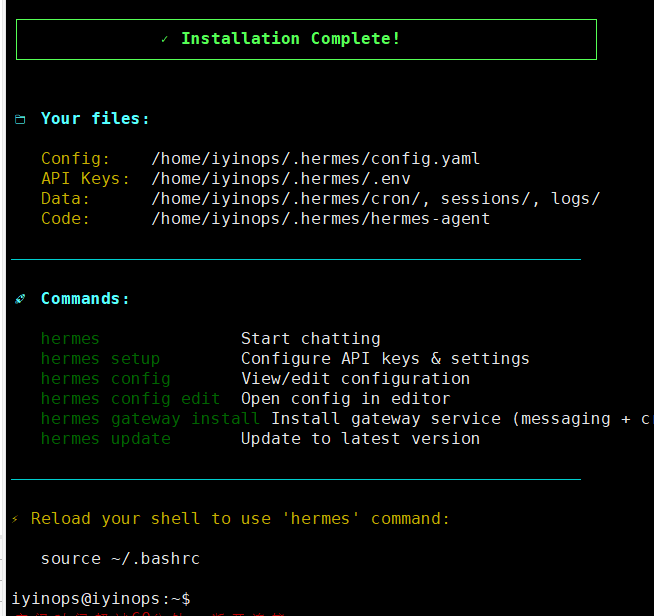
安装完成后按照提示加载环境变量,然后就可以正常看到版本,如下:
source /root/.bashrc
hermes --version2、如果需要对接消息平台,比如飞书、微信,那就需要启用gateway,上图中已经给了命令
hermes gateway install问答直接默认y,如下:
Start the gateway now after installing the service? [Y/n]: y
Start the gateway automatically on login/boot with systemd? [Y/n]: y
注:安装后的service位置在~/.config/systemd/users目录下
3、用户服务启停命令
# 重载
systemctl --user daemon-reload
# 开机自启
systemctl --user enable hermes-gateway
# 启动
systemctl --user start hermes-gateway
# 查看状态
systemctl --user status hermes-gateway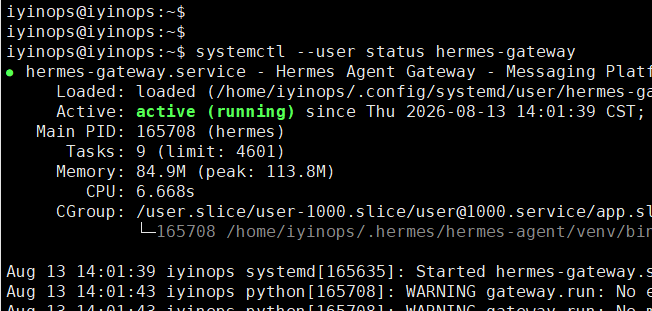
注:如果是创建的其他profile,那么就使用其他的profile来安装gateway,如下:
hermes profile create abcd
abcd gateway install
systemctl --user daemon-reload
systemctl --user enable hermes-gateway-abcd
systemctl --user start hermes-gateway-abcd
docker部署
1、先创建桥接网络,如下:
docker network create -d bridge hermes-net2、创建本地目录,映射到容器中,如下:
mkdir -p /data/hermes && chmod 777 /data/hermes3、编辑docker-compose.yaml,dashboard也是内置的,内容如下:
services:
  hermes:
    image: nousresearch/hermes-agent:latest
    container_name: hermes
    restart: unless-stopped
    command: gateway run
    ports:
      - "8642:8642"
    volumes:
      - /data/hermes:/opt/data
    networks:
      - hermes-net
        #    deploy:
        #      resources:
        #        limits:
        #          memory: 4G
        #          cpus: "2.0"

  dashboard:
    image: nousresearch/hermes-agent:latest
    container_name: hermes-dashboard
    restart: unless-stopped
    command: dashboard --host 0.0.0.0 --insecure
    ports:
      - "9119:9119"
    volumes:
      - /data/hermes:/opt/data
    environment:
      - GATEWAY_HEALTH_URL=http://hermes:8642
    networks:
      - hermes-net
    depends_on:
      - hermes
        #    deploy:
        #      resources:
        #        limits:
        #          memory: 512M
        #          cpus: "0.5"

networks:
  hermes-net:
    driver: bridge
    name: hermes-net
3、执行命令启动hermes agent 和dashboard,如下:
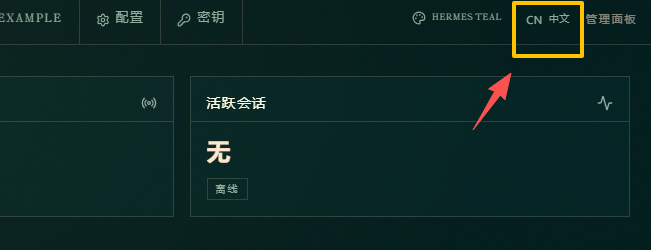
docker-compose up -d4、通过IP:9119可以登录到dashboard页面先切换到中文状态,如图:
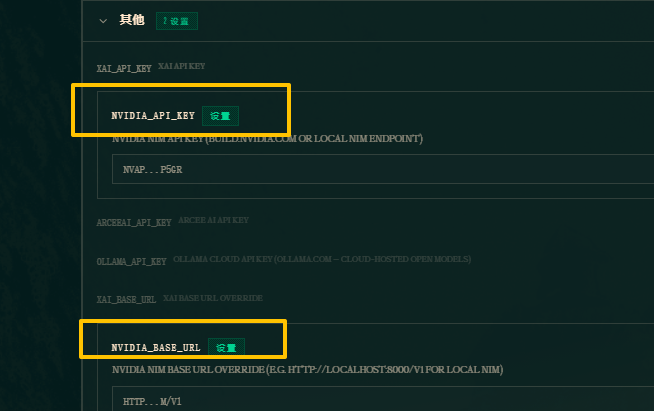
5、配置模型,我这里演示的是配置英伟达模型,点击密钥–LLM提供商–其他,填写nvidia的url和密钥,如图:
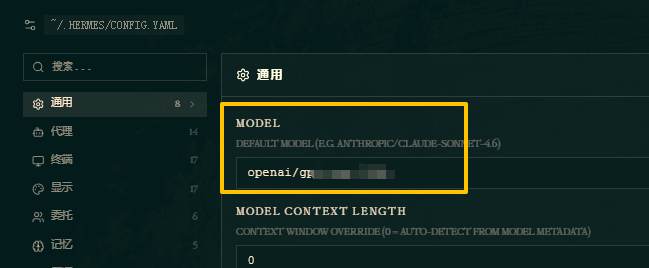
然后在配置–通用-model里,配置模型名,签名不用加nvidia,如图:
6、测试,进入容器中,执行命令,进入到聊天界面,如下:
/opt/hermes/.venv/bin/hermes chat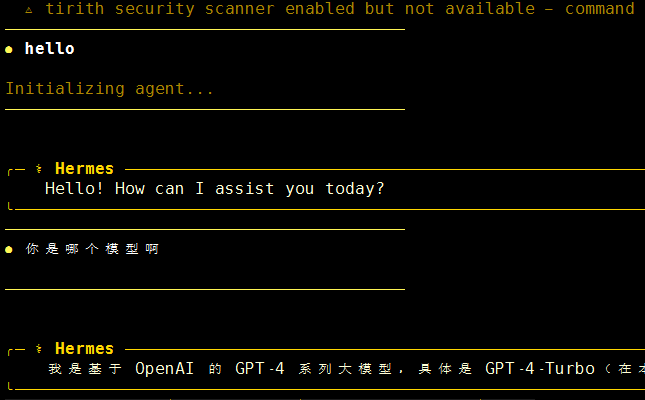
开启HTTP API接口
开启HTTP API接口后,可以通过第三方应用调用,比如通过golang调用接口,开启方法
1、API开起方式只能通过.env文件方式,写入内容:
cat >> ~/.hermes/.env <<'EOF'
API_SERVER_ENABLED=true
API_SERVER_PORT=8642
API_SERVER_HOST=0.0.0.0
API_SERVER_KEY=sk-$(openssl rand -hex 16)
EOF- API_SERVER_KEY: 经过实际测试,这个数值至少要16位,否则8642根本起不来
注:如果是创建了profile,那么如果想针对这个profile配置API,那就要在这个profile下的.env文件中,如下:
#创建的profile是gong
cat >> ~/.hermes/profiles/gong/.env <<'EOF'
API_SERVER_ENABLED=true
API_SERVER_PORT=8642
API_SERVER_HOST=127.0.0.1
API_SERVER_KEY=gong-$(openssl rand -hex 16)
EOF
#重启gateway
systemctl --user restart hermes-gateway-gong.service
2、API接口也是通过gateway来管理,就是对接消息平台的那个网关,重启网关,如下:
systemctl --user restart hermes-gateway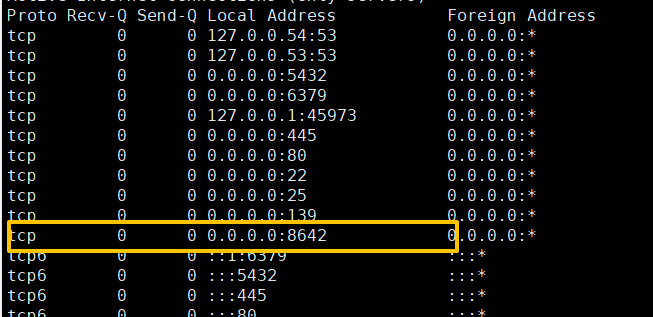
查看服务状态,如图: