服务端运行xray,通过容器方式运行,客户端运行sing-box,本例子通过本地方式运行
涉及镜像:
ghcr.io/xtls/xray-core:latest服务端
1、创建目录
mkdir /data/xray2、生成UUID和Reality密钥
docker run --rm --entrypoint xray ghcr.io/xtls/xray-core uuid #uuid执行后可以看到有个UUID输出在终端上,最下方,比如:
71dbc39e-***********再次执行命令生成Reality密钥
docker run --rm --entrypoint xray ghcr.io/xtls/xray-core x25519可以看到类似如下输出:
PrivateKey: 4Oe8****
Password (PublicKey): 0fyZN3B8L***
Hash32: NWx1aC0jYsn_pqJ4U***
3、编辑vim /data/xray/config.json,内容如下:
{
  "log": {
    "loglevel": "info"
  },
  "inbounds": [
    {
      "tag": "vless-reality-in",
      "listen": "0.0.0.0",
      "port": 8443,
      "protocol": "vless",
      "settings": {
        "clients": [
          {
            "id": "UUID",
            "email": "user1",
	    "flow": "xtls-rprx-vision"
          }
        ],
        "decryption": "none"
      },
      "streamSettings": {
        "network": "tcp",
        "security": "reality",
        "realitySettings": {
          "show": false,
          "dest": "www.cloudflare.com:443",
          "xver": 0,
          "serverNames": [
            "www.cloudflare.com"
          ],
          "privateKey": "私钥",
          "shortIds": [
            "02625182af"
          ]
        }
      },
      "sniffing": {
        "enabled": true,
        "destOverride": [
          "http",
          "tls",
          "quic"
        ]
      }
    }
  ],
  "outbounds": [
    {
      "tag": "direct",
      "protocol": "freedom"
    },
    {
      "tag": "block",
      "protocol": "blackhole"
    }
  ]
}
- inbounds: 入站
- listen: 监听所有地址
- port: 端口443
- protocol: 协议为vless
id: "UUID":客户端凭据,必须换成实际生成的 UUID,例如运行xray uuid生成;客户端要填写同一个 UUIDflow: "xtls-rprx-vision":使用 Vision 流控;客户端也要配置相同 flowdecryption: "none":VLESS 本身不在此处配置加密;REALITY/TLS 层负责连接握手保护。客户端通常对应设置encryption: "none"network: "tcp":使用 TCP 传输security: "reality":启用 REALITYshow: false:不输出额外的 REALITY 调试信息dest: "www.cloudflare.com:443":未通过 REALITY 身份验证的连接会被转发到此目标,作为伪装站点。目标站点应能在 443 端口正常提供 TLS;REALITY 官方文档也提醒,未认证流量会转发到目标,因此目标和服务器配置要谨慎选择,这里只能写一个地址xver: 0:转发到dest时不附加 PROXY protocol 元数据serverNames: ["www.cloudflare.com"]:允许客户端使用的 SNI 名称;客户端填写的 SNI 必须与其中一个匹配,这是数组,可以写多个privateKey: "私钥":这里必须填 REALITY 的 X25519 私钥,不能保留中文占位文字。可用xray x25519生成;相应公钥配置在客户端shortIds: ["02625182af"]:服务端认可的短 ID 列表。客户端使用其中一个;这是十六进制字符串,长度须为偶数且不超过 16 个字符enabled: true:尝试从连接中识别目标协议或域名信息destOverride: ["http", "tls", "quic"]:尝试从 HTTP、TLS、QUIC 流量中提取目标信息,供路由规则使用。若没有依赖基于域名的路由,通常不是建立这个入站的必需项outbounds:出站决定 Xray 如何处理收到的流量direct/protocol: "freedom":直接连接目标网站block/protocol: "blackhole":丢弃流量,通常由路由规则指定何时使用
可通过如下命令测试dest的和serverNames是否符合要求,测试成功的地址可以写入dest和serverNames中,如下:
openssl s_client \
  -connect www.cloudflare.com:443 \
  -servername www.cloudflare.com \
  -tls1_3 \
  -alpn h2 </dev/null
如果返回如下几项,说明符合要求
TLSv1.3:TLS 1.3 握手成功ALPN protocol: h2:协商到了 HTTP/2Verification: OK和Verify return code: 0 (ok):证书验证通过subject=CN = www.cloudflare.com:返回的证书名称与测试的主机名相符
4、编辑vim /data/xray/docker-compose.yml,内容如下:
services:
  xray:
    image: ghcr.io/xtls/xray-core:latest
    container_name: xray
    restart: unless-stopped
    ports:
      - "443:443/tcp"
    volumes:
      - ./config.json:/usr/local/etc/xray/config.json:ro
    command: ["run", "-config", "/usr/local/etc/xray/config.json"]
5、启动
docker-compose up -d客户端
1、安装sing-box(本例子为:1.13.14版本)
curl -fsSL https://sing-box.app/install.sh | sh2、编辑vim /etc/sing-box/config.json,内容如下:
{
  "log": {
    "level": "info",
    "timestamp": true
  },
  "dns": {
    "servers": [
      {
        "type": "udp",
        "tag": "dns-cn",
        "server": "223.5.5.5",
        "server_port": 53
      },
      {
        "type": "https",
        "tag": "dns-remote",
        "server": "1.1.1.1",
        "server_port": 443,
        "path": "/dns-query",
        "tls": {
          "enabled": true,
          "server_name": "cloudflare-dns.com"
        },
        "detour": "proxy"
      }
    ],
    "rules": [
      {
        "domain_suffix": [
          ".cn",
          ".baidu.com",
          ".qq.com",
          ".weixin.qq.com"
        ],
        "action": "route",
        "server": "dns-cn"
      },
      {
        "domain": [
          "cn.bing.com"
        ],
        "action": "route",
        "server": "dns-cn"
      }
    ],
    "final": "dns-remote",
    "strategy": "prefer_ipv4",
    "cache_capacity": 4096
  },
  "inbounds": [
    {
      "type": "http",
      "tag": "http-in",
      "listen": "0.0.0.0",
      "listen_port": 17890
    }
  ],
  "outbounds": [
    {
      "type": "vless",
      "tag": "proxy",
      "server": "xray服务端IP",
      "server_port": 8443,
      "uuid": "上面生成的UUID",
      "flow": "xtls-rprx-vision",
      "tls": {
        "enabled": true,
        "server_name": "www.cloudflare.com",
        "utls": {
          "enabled": true,
          "fingerprint": "chrome"
        },
        "reality": {
          "enabled": true,
          "public_key": "上面生成的公钥",
          "short_id": "02625182af"
        }
      }
    },
    {
      "type": "direct",
      "tag": "direct"
    }
  ],
  "route": {
    "default_domain_resolver": {
      "server": "dns-cn",
      "strategy": "prefer_ipv4"
    },
    "rules": [
      {
        "action": "sniff"
      },
      {
        "protocol": "dns",
        "action": "hijack-dns"
      },
      {
        "domain_suffix": [
          ".cn",
          ".baidu.com",
          ".qq.com",
          ".weixin.qq.com"
        ],
        "action": "route",
        "outbound": "direct"
      },
      {
        "domain": [
          "cn.bing.com"
        ],
        "action": "route",
        "outbound": "direct"
      },
      {
        "domain_suffix": [
          ".ad.com",
          ".ads.com"
        ],
        "action": "reject"
      }
    ],
    "final": "proxy",
    "auto_detect_interface": true
  }
}- short_id:要与服务端对应,可自定义,要16进制开头的,并且只能是偶数个数8位或者10位这样
- flow: 也要与服务端对应
- 17890: 可自定义,主要用作给其他机器代理用
3、检测配置并启动,如下:
sing-box check -c /etc/sing-box/config.json
systemctl restart sing-box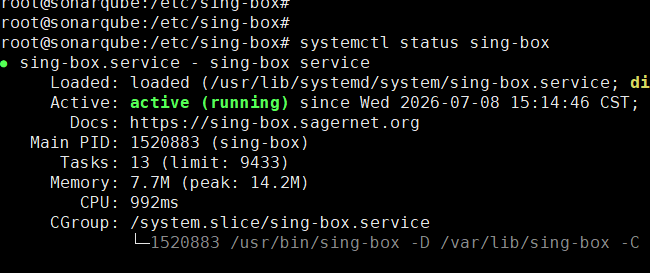
本机测试:
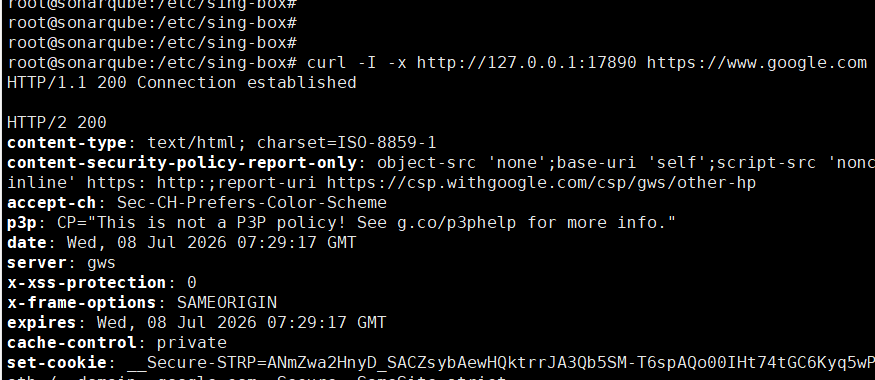
其他windows机器直接在代理位置配置对应的IP和17890端口即可,如果是linux,可通过如下配置
export http_proxy=http://ip:18790
export https_proxy=http://ip:18790